
Use Case:
automatically generate public image URL which is required to use with many AI image generation model as user input
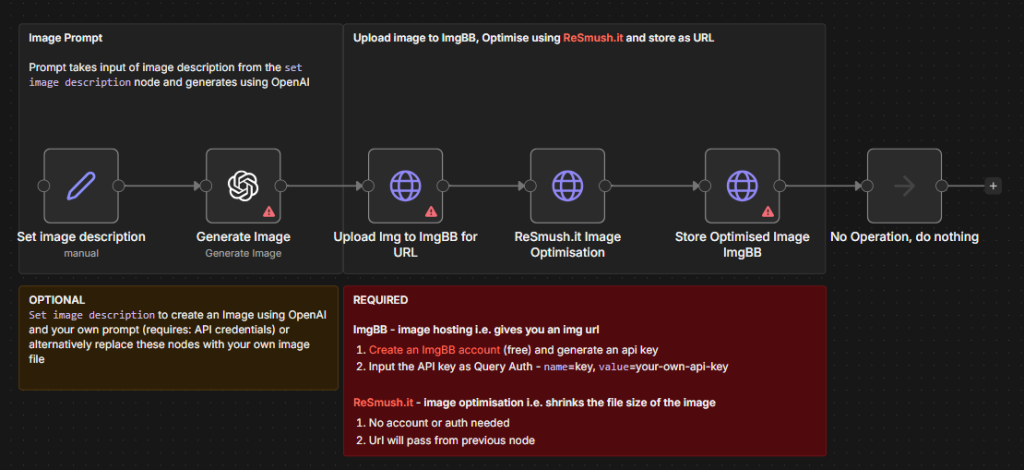
Step 1 : Setup a new n8n workflow, if this is your first time you can setup the free trial cloud based n8n here
Step 2: Download the Convert Image template here and import that into the workflow
Step 3: Setup IMGBB‘s API it’s free
Step 3: Change all necessary credentials before activating the workflow
Disclosure: Some links may contain affiliate links to earn commission to support the website
You need to host local images online
You want to reduce image file sizes automatically
You need image such as PNG or JPG to Public URLs for web content
You want to generate and optimize AI-created images
What this Workflow Does:
The workflow processes images through two services:
Uploads images to ImgBB for hosting and URL generation (free but need API key)
Optimizes images using ReSmush.it to reduce file size (free)
Optional: Creates images using OpenAI’s image generation
Returns optimized image URLs ready for use
Setup:
Create an ImgBB account and get your API key
Add your ImgBB API key to the HTTP Request node (key parameter)
Optional: Configure OpenAI credentials for image generation
Connect your image input source
How to Adjust it to Your Needs:
Skip OpenAI nodes if using your own image files
Adjust image optimization parameters
Customize image hosting settings
Modify output format for your needs